Quick Edit from the Admin Listings Page
Please add a Quick edit option to each listing on the admin Listings page, allowing administrators to update basic information without opening the full listing editor.
Currently, each listing must be opened individually to make even a small change. When reviewing and maintaining thousands of listings, those extra steps take considerable time.
Suggested functionality
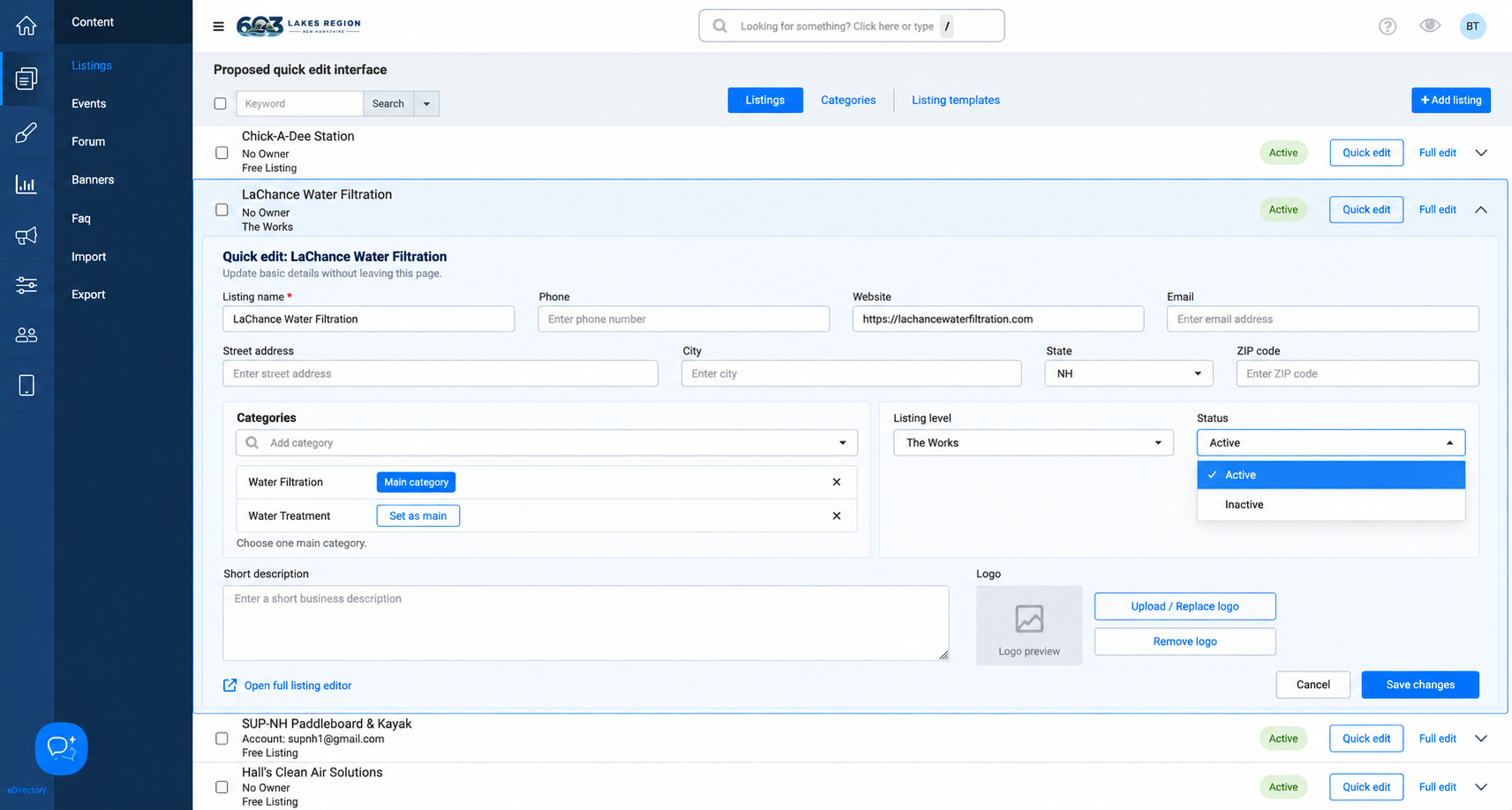
Clicking Quick edit would expand a compact form directly beneath the selected listing, as shown in the attached mockup. Editable fields would include:
Listing name
Phone number, email, and website
Street address, city, state, and ZIP code
Categories
Listing level
Active or inactive status
Short description
Logo
The form should include Save changes and Cancel buttons, along with a link to the full listing editor for more detailed changes.
Expected behavior
Saving should update the listing without reloading the page or losing the current search, filters, pagination, or scroll position. A clear confirmation should appear after a successful save. Cancel should discard unsaved changes and collapse the form.
Existing field validation and administrator permissions should apply to quick edits.
This feature would make routine listing maintenance much faster, particularly when correcting contact information, adjusting categories, or reviewing several listings in sequence.
The attached mockup illustrates how this could fit within the existing admin interface.
Log in to comment and vote
No comments yet
Be the first to share your thoughts.